
Business cards and stationery
Business cards
UC ANR employees can order full-color business cards through this site: UC Davis Repro Graphics My Print.
If you need a 2-sided card, or if you find that all of your information will not fit on a standard card, please read about custom business cards.
ReproGraphics business card prices (as of July 2018):
1-sided cards:
- 250 cards — $32.55 plus shipping
- 500 cards — $43.05 plus shipping
- 1,000 cards — $74.55 plus shipping
2 sided cards:
- 250 cards — $53.38 plus shipping
- 500 cards — $70.60 plus shipping
- 1,000 cards — $119.99 plus shipping
If you have never used the My Print site before, you will be required to register and setup a password. Once you are registered, log in to the site.
Under "Search Catalog," type "ANR" into the search field and click the "Go" button. All five ANR business card style options will be displayed. Choose one and follow the instructions. After filling in all the appropriate fields, click “Proof” to see a PDF proof. If you need to change or correct your information, you can do so now. If you’d like to choose a different card style, click “Cancel” to go back to the previous window to see all the card styles. Once you have completed the proofing stage, click “Continue with Order” to complete the process.
Look here for more detailed information.
UC ANR academic personnel: When ordering your cards - make sure you use the UC ANR title conventions outlined in the Style Guide.
The following business card styles are available:
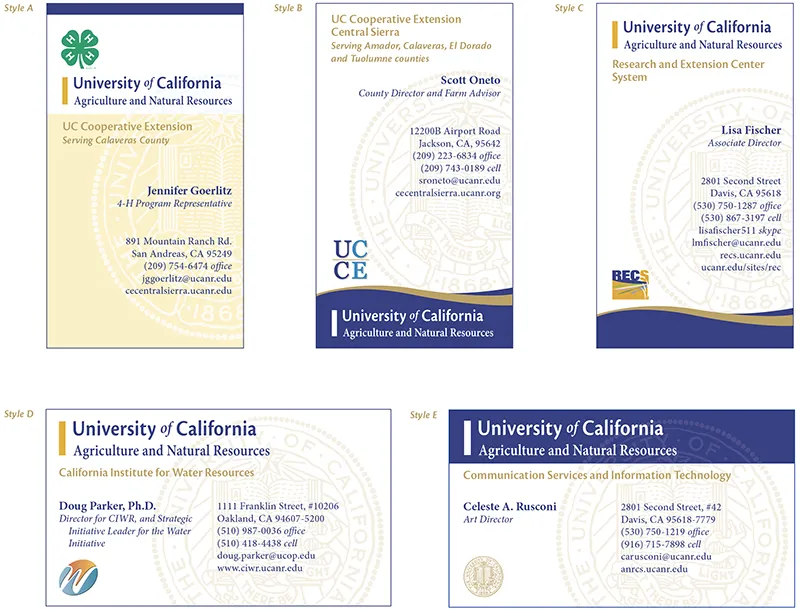
Steps for using the new MyPrint business card ordering site:
- Go to: myprint.ucdavis.edu
- Under Search Catalog, type “anr” and hit Go.
- On this page you will see the five business card styles you can choose from.
- Choose a style and select “Configure". Note: above the word Configure you will see numbers. These represent the cost per card.
- This is where you enter text into the fields. Under Unit Name, you can choose from the drop down options or choose “custom” and enter your own text within the Custom Unit Name field. Ditto for the Unit Sub Name field.
- Continue to enter text in the fields. If you find that a name, plus credentials is too long to fit on one line then you will need to order a custom card through the Toolkit site intake form. When entering a phone number you can choose the type of number in the drop down above the text field.
- After filling in all the text fields, choose a logo (or pick “none”) at the bottom of the window.
- Click “Update Preview” and you will see a LIVE proof of your card. At this point you can go back in to the text fields and fix any spelling errors or change any text or even choose a different logo. Click “Update Preview” again and you’ll see another proof.
- If you need to show this proof to someone else for their approval, click “Proof” and another window will open with the card preview. Here you can use the magnifying glass to check things very carefully. You can also choose to download this proof to your computer so that you can email it to someone else.
- Once you are satisfied with the proof, click “Continue with Order”.
- The next window takes you to the Cart. Here you will enter shipping and billing information. You will also see the final cost as well as delivery date for the cards. Continue and finalize your order.
Letterhead and envelopes
To order custom printed letterhead and/or envelopes, see the Custom letterhead and envelopes page.
If you don't want to use or pay for custom printed letterhead and/or envelopes, you can print your own using the standard templates here, or the program templates here.
Custom business cards
If you want to use your own vendor to print business cards, if you need a 2-sided card, or if all of your information will not fit on a standard card Communication Services can prepare a print-ready PDF of a color business card for a fee. Your exact charges will vary, based on the complexity of the design.
Select one of the card styles from above, then complete this intake form to start the process.
All custom business card designs will comply with the UC ANR Style Guide regarding use of program logos. The same objectives for a sleek, professional look apply to custom cards.