
Content Hub is IWP's search tool for finding information across UC ANR websites and blogs. It searches published IWP content and uses tags and other information to help visitors find relevant results.
Content Hub can search across UC ANR or within a specific site or blog. Visitors can also use filters to narrow their results.
How Content Hub works
Content Hub brings together published content from across IWP, including Articles, Pages, Collections, sites and blogs. Search results can be refined using filters based on the information and tags associated with the content.
Using appropriate tags on your content and Groups helps Content Hub organize information and return more relevant results. As tagging across IWP continues to improve, search results will improve as well.
Search with Content Hub
There are two primary ways to search using Content Hub.
Search across UC ANR
Use the search field in the main UC ANR navigation to search published content across IWP.

Search within a site or blog
When you search from within a site or blog, Content Hub can limit results to content associated with that Group. This provides a more focused search experience for visitors looking for information within a particular UC ANR site.

After entering a search term, check the current filters at the top of the results to confirm that your search is limited to the appropriate site or blog.
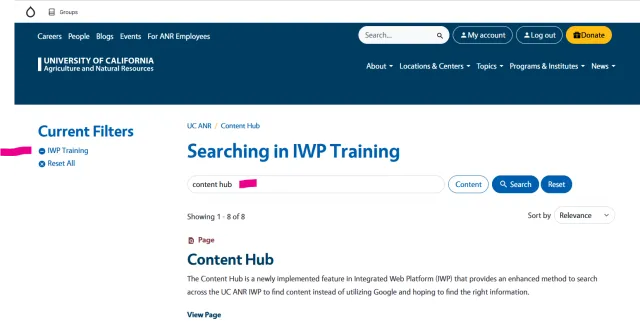
Content Hub search results
The Content Hub results page provides several options for finding and refining information.

1. Current filters
Shows the filters currently being applied to your search results.
2. Filters
Provides options for narrowing your results based on available content information and tags.
3. Keywords
Shows the word or phrase being used for the search. You can change your keywords to start a different search.
4. Sites, content and blogs
Allows you to narrow results by type, such as sites, blogs or individual content items.
5. Results
Displays items that match your search, including Pages, Articles, sites and blogs. Each result includes information to help identify the type of content and where it belongs. Select a result to view it.
6. Sort
Provides options for changing the order of your search results.
Get better search results
Use specific keywords
Specific search terms generally return more useful results. For example, searching for drought-resistant plants will provide more focused results than searching for plants.
Use filters
Use the available filters to narrow a large set of results by content type, site, blog or other available criteria.
Tag your content
If you create or manage content in IWP, use appropriate tags for your content and Groups. Consistent tagging helps Content Hub connect visitors with relevant information across UC ANR.