
There are several ways to contact the IT Help Desk and file a ticket.
For help with software or hardware — such as installations, crashes, login issues, slow computer, or printer problems — email help@ucanr.edu.
For ANR website issues such as broken links, errors, or publishing problems, email iwp@ucanr.edu.
In either case, include the following in your message:
- As much detail as possible about the issue.
- Any relevant URLs.
- What you were doing when the issue occurred.
- The exact error messages you received.
- What steps you have already tried.
- The date and time the issue started.
- Whether the issue prevents you or others from working.
Phone
Call the IT Help Desk at (530) 750-1212.
ServiceNow
Go to UCANR ServiceNow and select IT Help Ticket (Incident).
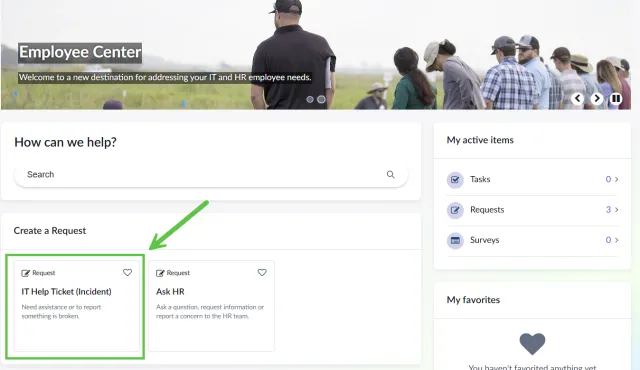
Create a ticket
When creating the ticket, include the following:
- As much detail as possible about the issue.
- Any relevant URLs.
- What you were doing when the issue occurred.
- The exact error messages you received.
- What steps you have already tried.
- The date and time the issue started.
- Whether the issue prevents you or others from working.
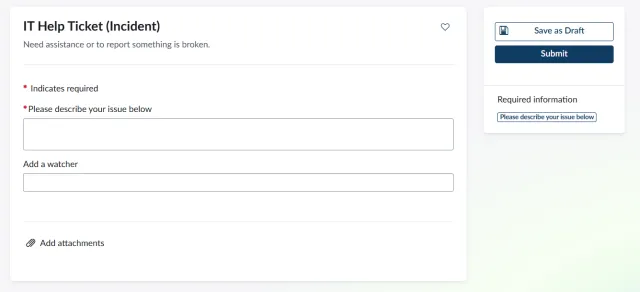
Add a watcher
Add anyone with an interest in the ticket as a watcher.
Add attachments
Screenshots, files, and logs help IT resolve your issue faster:
- Screenshots — capture the error screen including the URL bar. Windows: Print Screen or Windows+Shift+S. Mac: Command+Shift+4.
- Files — upload any relevant documents or attachments.
- Logs — copy and paste any relevant error messages directly into the ticket.
Submit and track
Click Submit Ticket. You will receive a confirmation email with a tracking number. Use this number to check the status or add updates if the issue changes.
Tips for a good ticket
- Be specific. "Excel crashes when I copy and paste into column C" is more helpful than "Excel doesn't work."
- Always include a URL for website questions.
- Always include screenshots or error codes.
- If multiple people are affected, mention that.
- Submit one issue per ticket — separate problems should have separate tickets.
Knowledge Base
Find answers to common IT questions in the IT Knowledge Base.