
You are able to embed a collection on Page content type in IWP. This can be used to embed a collection of other sites/blogs, specific events or other materials that are needed to associate together. To learn more about Collections and how to set up, Collections.
To add Collections to a page:
- Navigate to the desired page you are looking to embed the collection.
- Edit the page.
- Scroll down to the Featured Collections field.
- Select the down arrow to expand Collection.

- Click Select Entities button to open the list of collections in your site.

- In the open dialog, use the search of Title or URL alias to find your desired collection. Click the checkbox(es) for collections to include and then Select content.
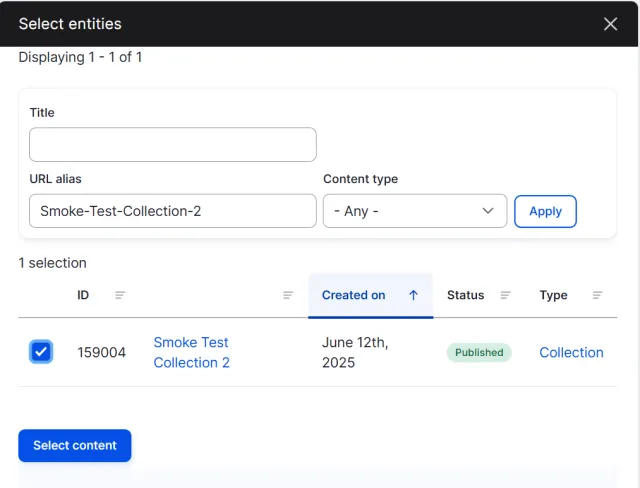
- The collection(s) will be added to the list of collections to display on the page.
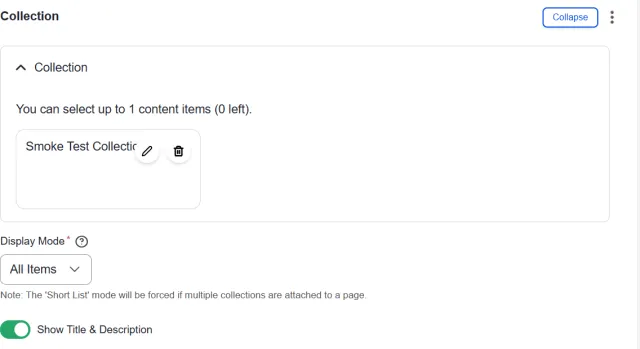
- For Display Mode, select whether you want to list all items in the collection or a shortened list with a link to view more.
- Toggle off the Show Title & Description field if you want to hide the collections title and body text from displaying on the page.
- Click the Save button.
- Collections will then display at the bottom of the page where you can then click to view the collection.
