
In IWP/Drupal, URLs are typically auto-generated using the Group Site name and the Content Title (such as a page or article). However, you can customize this by manually setting a Custom Slug.
What is a Slug?
A slug is the URL-friendly part of a webpage’s path — usually the final segment of the URL. It’s automatically created from the content title and helps make URLs human-readable and SEO-friendly.
Note: Custom slugs must be unique within your Group Site.
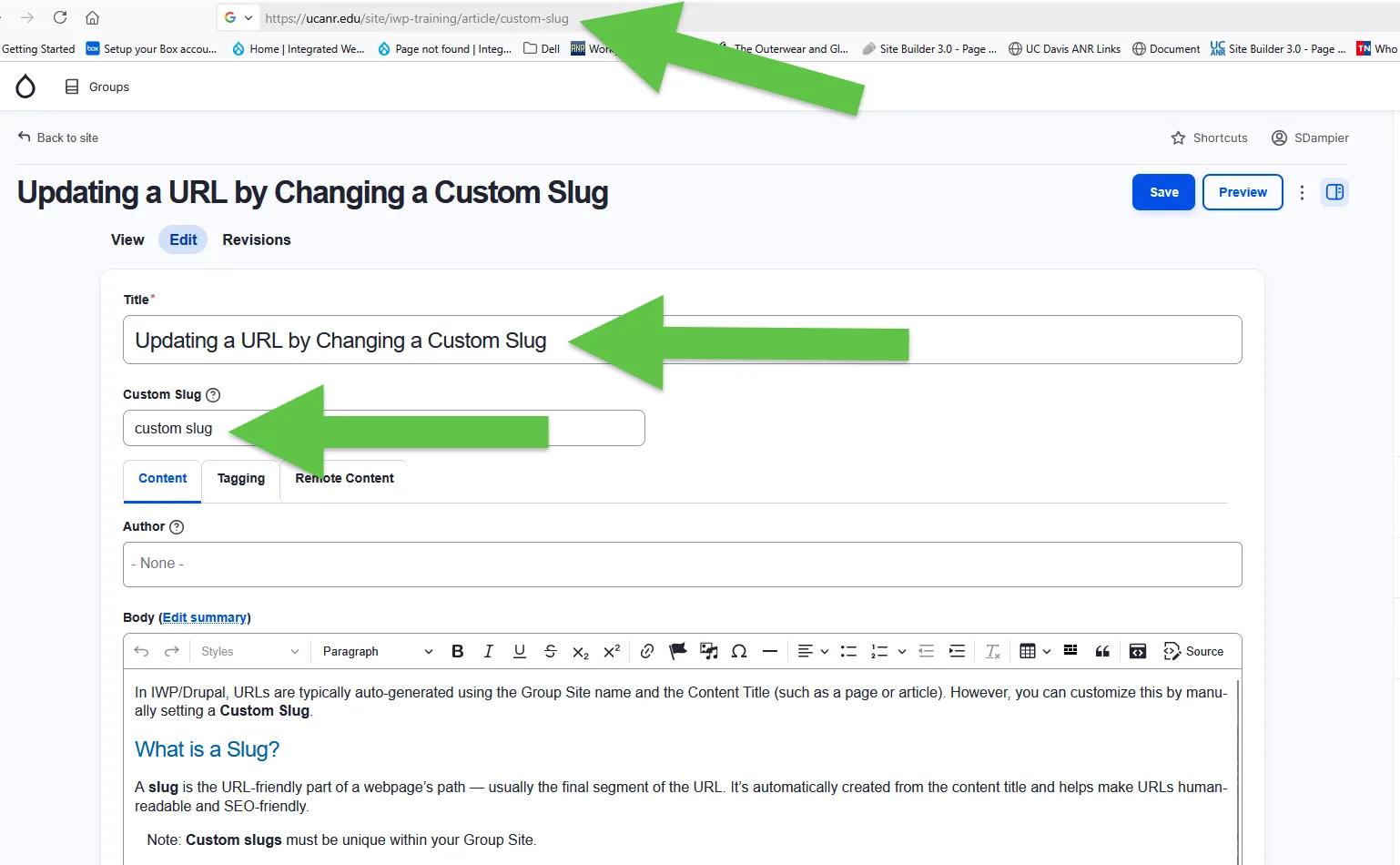
Example
If your blog post is titled:
Updating a URL by Changing a Custom Slug
The default URL might look like:
https://ucanr.edu/site/iwp-training/article/updating-a-url-by-changing-a-custom-slug
If you prefer a shorter URL, you can update the slug to something like:
custom-slug
Or simply enter custom slug, and the system will automatically convert it to a URL-friendly format (with hyphens).
Be sure to save your changes.
Naming Guidelines
Use lowercase letters
Separate words with hyphens (not spaces or underscores)
Avoid special characters or accents
Finalizing Your Custom Slug
To apply your custom slug across the system, you’ll need developer support.
Submit an IWP ticket
Include the following:
- The original URL of the Group Site/Content
- The new URL you’re changing it to
- A request for a "Bulk Update on Cron"
This step ensures the new URL is properly updated across all references in the system.